


Announcing stable direct native interoperability
FFIgen for Objective-C and JNIgen for Java/Kotlin are now stable, and Pigeon puts them to work so your plugins can call native code directly

Last year, we introduced our vision for direct native interoperability, aimed at making access to platform APIs a lower effort for Flutter developers. Our initial goal was to solve the fundamental challenge with using method channels to call native APIs on Android and iOS.
Today, we’re taking a massive step toward that goal. We’re excited to announce that FFIgen for Objective-C and JNIgen are now stable, and that Pigeon has evolved to put these tools to work under the hood.
This is a big shift in how we build plugins. We are moving away from the serialization and latency of traditional platform channels toward direct, type-safe, and incredibly fast code-generated bindings.
Why we built something new
If you have ever built a Flutter plugin, you have probably wrestled with platform channels. They have been the default way to access native APIs for years, but they come with a lot of friction.
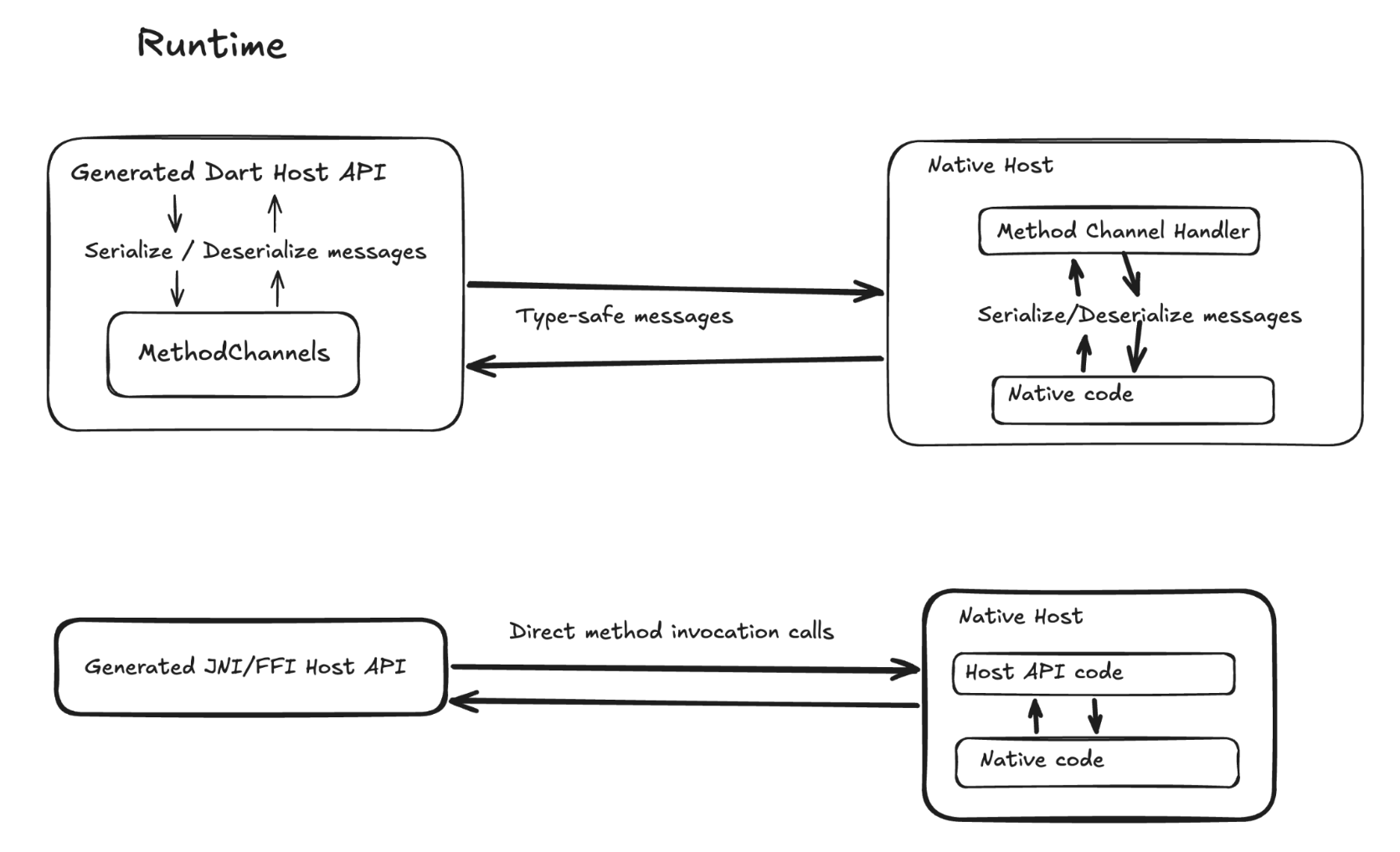
Platform channels rely on message passing. When your Dart code wants to talk to iOS or Android, it has to serialize the data into a binary buffer, send it across a bridge, deserialize it on the native side, run the native API, and then reverse the entire process to send the result back.
This process is time-consuming to write, error prone, and can lead to performance issues. If a native API changes, you have to manually update the string-based message handlers on both sides. Additionally platform channels are strictly asynchronous to keep the UI responsive, which results in a lot of async boilerplate and potential latency to native calls that should be instant.
Pigeon solved part of this. You describe your API once in a Dart file, and Pigeon generates type-safe code for both sides, so a typo in a method name becomes a compile-time error instead of a runtime bug. But under the hood, Pigeon still generated platform channel code, so every call still made that same serialized, asynchronous round trip.
That round trip is the problem we set out to solve: we wanted Dart to call native code directly.
Building a direct path
We started by building code generators, FFIgen and JNIgen, that create Dart bindings for native APIs. Instead of passing messages, your Dart code calls native code directly through FFI (Foreign Function Interface) or JNI (Java Native Interface):
- FFIgen generates bindings for C and Objective-C APIs. FFIgen for C has been stable for years, and as of today, FFIgen for Objective-C is stable too.
- JNIgen generates bindings for Java and Kotlin APIs, from Android system APIs to your own JARs and AARs. As of today, JNIgen is stable.
Direct calls unlock things that were really hard to do with message passing, like making synchronous calls into native APIs, or passing native objects and large amounts of raw data between Dart and native code without a serialization step. You can even call platform APIs straight from Dart, often without writing any native code at all. And because FFIgen and JNIgen generate plain Dart code, they work in any Dart project, with or without Flutter.
Raw FFIgen and JNIgen bindings work well for single-platform code and C-ABI libraries. Whether you're calling an Android-only API, using an iOS framework, or wrapping a C library like sqlite3, there's one native API to bind to, and the bindings give you direct access to all of it.
By design, FFIgen and JNIgen are low level and give you better performance with direct memory access, but in some cases at the cost of memory management and thread handling becoming the responsibility of the developer using them.
A preview: Pigeon with native interop
Many Flutter plugins span several platforms (such as Android + iOS). That also means a separate set of bindings for each platform, plus your own Dart layer to keep them consistent. That developer experience wasn't as friction free as we'd like.
So we decided to bring the developer ergonomics of Pigeon and the performance of native interop together. Pigeon can now use FFIgen and JNIgen under the hood.
Pigeon with native interop is available today as a preview. You get the type safety of a Pigeon contract with the speed of direct FFI and JNI calls: no serialization round trip, synchronous calls when you need them, and calls from background isolates. Pigeon handles data conversion and native object lifetimes, and only generates the bindings you need, so you skip the low-level work.
Pigeon with native interop currently supports only Android, iOS, and macOS. On Windows and Linux, Pigeon with platform channels works as it always has, and you can generate both from the same Pigeon file. Before we recommend Pigeon with native interop as the default way to build plugins, we want to hear how it works for you, especially if you try migrating an existing plugin that already uses Pigeon.
How to use it
The workflow is the same as Pigeon with platform channels: define your API in a Pigeon file, run Pigeon, and implement the generated interface in Swift or Kotlin. That implementation is still where you call the platform APIs you need. Pigeon handles everything between your Dart code and that interface.
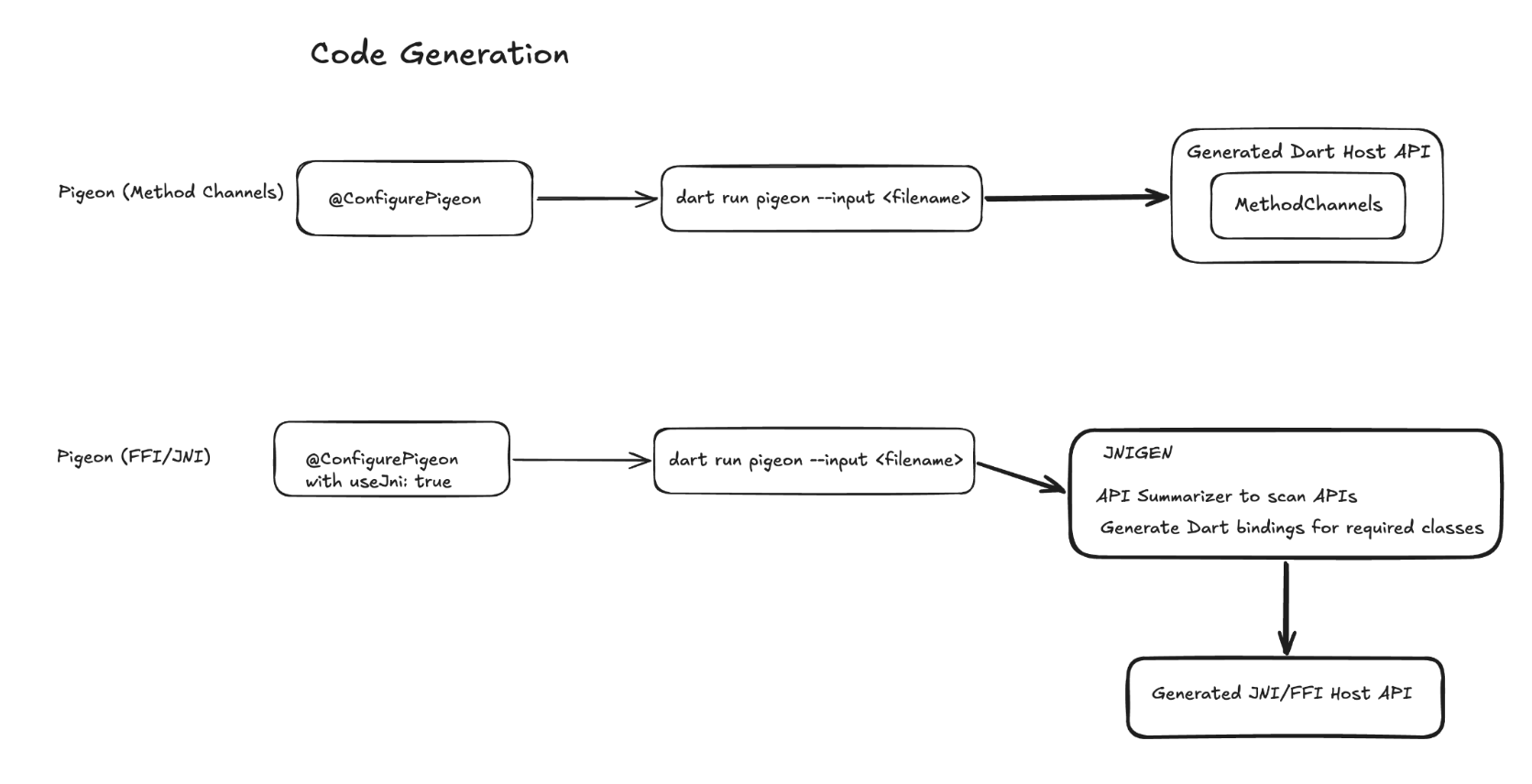
To turn on native interop, set a few options in the
@ConfigurePigeon annotation at the top of that same Pigeon file.
pigeons/messages.dart: the same Pigeon definition file you use today:
@ConfigurePigeon(
PigeonOptions(
// ...keep your existing input and output paths...
// Tells FFIgen and JNIgen where your compiled app lives (for a plugin, its example app).
appDirectory: 'example/',
// iOS and macOS: call your Swift implementation directly through FFI.
swiftOptions: SwiftOptions(useFfi: true),
// Android: call your Kotlin implementation directly through JNI.
kotlinOptions: KotlinOptions(useJni: true),
),
)
We've recently updated shared_preferences, one of the most popular plugins on pub.dev, to use Pigeon with native interop. If you already have a Pigeon plugin, the shared_preferences source code is a good example.
Migrating an existing plugin to Pigeon is mostly configuration:
add the interop dependencies, set useFfi and useJni, and re-run Pigeon.
The migration guide
is based on learnings from moving shared_preferences over,
and it walks you through the remaining build and registration updates.
If you work with an AI coding agent, there's also a native interop migration skill
that guides your agent through the same steps.
AI agents are getting better at generating idiomatic Dart wrappers from raw FFIgen and JNIgen output, but still benefit from what Pigeon offers: a consistent cross-platform API, memory safety across the Dart and native runtimes, unit-testable plugin code, orchestration of each platform's toolchain, and generated code that stays deterministic and maintainable over time. Your feedback on the preview will shape how we get there.
Try direct native interop today
This milestone is the result of years of design, iteration, and feedback. We want to extend a massive thank you to all the package authors, contributors, developers, and Early Access Program (EAP) participants especially Jon Holtan, Rody Davis, Dominik Roszkowski, Alexander Thiele, and Morgan McKenzie who tested early previews, reviewed our new docs, filed bugs, and helped shape these releases.
If you're building plugins or need access to native APIs, we'd love for you to try direct native interop. Head over to our restructured interop docs on flutter.dev for more details on each tool and how to get started. And if you migrate a plugin to Pigeon with native interop, let us know if you have any issues.
We can't wait to see what you build!
More from Flutter

How I converted GenLatte to fullstack Dart
And reduced the app's server bill

Quick, reliable calculations with A2UI's Client-Side Functions
Learn how client-side functions allow an agent to delegate local operations directly to Dart code running on a user's device.
